
Getting Started with ASP.NET Core Web API
TLDR
ControllerBaseis the base class for Web API. If you need support for Views or Filter events, inherit fromControllerinstead.[ApiController]enables features like attribute routing, automatic HTTP 400 responses, and parameter binding inference.- It is recommended to use
ActionResult<T>as the Action return type to balance data return and status code handling. - Asynchronous methods should be suffixed with
Asyncand useTask<T>as the return type. - When integrating Swagger, ensure every Action is explicitly marked with an HTTP Attribute (e.g.,
[HttpGet]), otherwise, it may cause UI display issues. - You can use
IOperationFilterto add global input fields (such as Tokens) in Swagger. - By using
GenerateDocumentationFileandIncludeXmlComments, you can automatically integrate XML comments into Swagger documentation.
ControllerBase and ApiController
When to encounter this issue: When you need to distinguish between MVC and Web API Controller behaviors, or wish to simplify API validation logic.
- ControllerBase: The default base class for Web API in ASP.NET Core. If you need to support Views or handle Filter events like
OnActionExecuting, inherit fromControllerinstead. - ApiController: Adding this Attribute automatically enables mechanisms such as attribute routing, automatic HTTP 400 responses, and binding source inference.
- Custom Base Class: If you do not want to repeat declarations in every Controller, you can define a
BasicControllerthat inherits fromControllerBaseand add[ApiController], then have other Controllers inherit from it.
If you need to disable specific ApiController behaviors, you can adjust them in Program.cs:
csharp
builder.Services.AddControllers()
    .ConfigureApiBehaviorOptions(options => {
        options.SuppressModelStateInvalidFilter = true; // Disable automatic HTTP 400 responses
        options.SuppressConsumesConstraintForFormFileParameters = true; // Disable form data inference
        options.SuppressInferBindingSourcesForParameters = true; // Disable parameter binding inference
        options.SuppressMapClientErrors = true; // Disable error details
});Routing Configuration and Parameter Binding
When to encounter this issue: When you need to define RESTful-style API routes or explicitly specify parameter sources.
- Routing Priority: From highest to lowest: Action > Controller > Base Controller.
- HTTP Verbs: You must explicitly use Attributes like
[HttpGet]or[HttpPost]. If not set, it defaults to GET. - Parameter Binding Inference:
[FromBody]: Handles complex types.[FromForm]: HandlesIFormFile.[FromRoute]: Handles route parameters.[FromQuery]: Handles query strings.
Return Types and Asynchronous Processing
When to encounter this issue: When you need to standardize the API return format and handle high-concurrency requests.
- Return Type Recommendations:
- Return status code only: Use
IActionResult. - Return data and status code: Use
ActionResult<T>.
- Return status code only: Use
- Asynchronous Implementation: Use the
asyncmodifier and returnTask<T>; it is recommended to end Action names withAsync.
csharp
[HttpGet("{id}")]
public async Task<ActionResult<string>> GetByIdAsync(int id) {
    var result = await _service.GetByIdAsync(id);
    return Ok(result);
}Swagger Documentation Integration
When to encounter this issue: When you need to generate interactive documentation for your API or customize API descriptions and fields.
- Basic Setup: After checking "Enable OpenAPI support", enable it via
AddSwaggerGen()andUseSwaggerUI(). - Notes: If an Action lacks an HTTP Attribute, Swagger may not parse it correctly; avoid designing
publicmethods that are not intended as Actions. - Extensions:
- Custom Input Fields: Implement the
IOperationFilterinterface and register it inAddSwaggerGen. - XML Comment Integration:
- Set
<GenerateDocumentationFile>true</GenerateDocumentationFile>in your.csprojfile. - Use
opt.IncludeXmlComments()inProgram.csto load the XML file. - Add
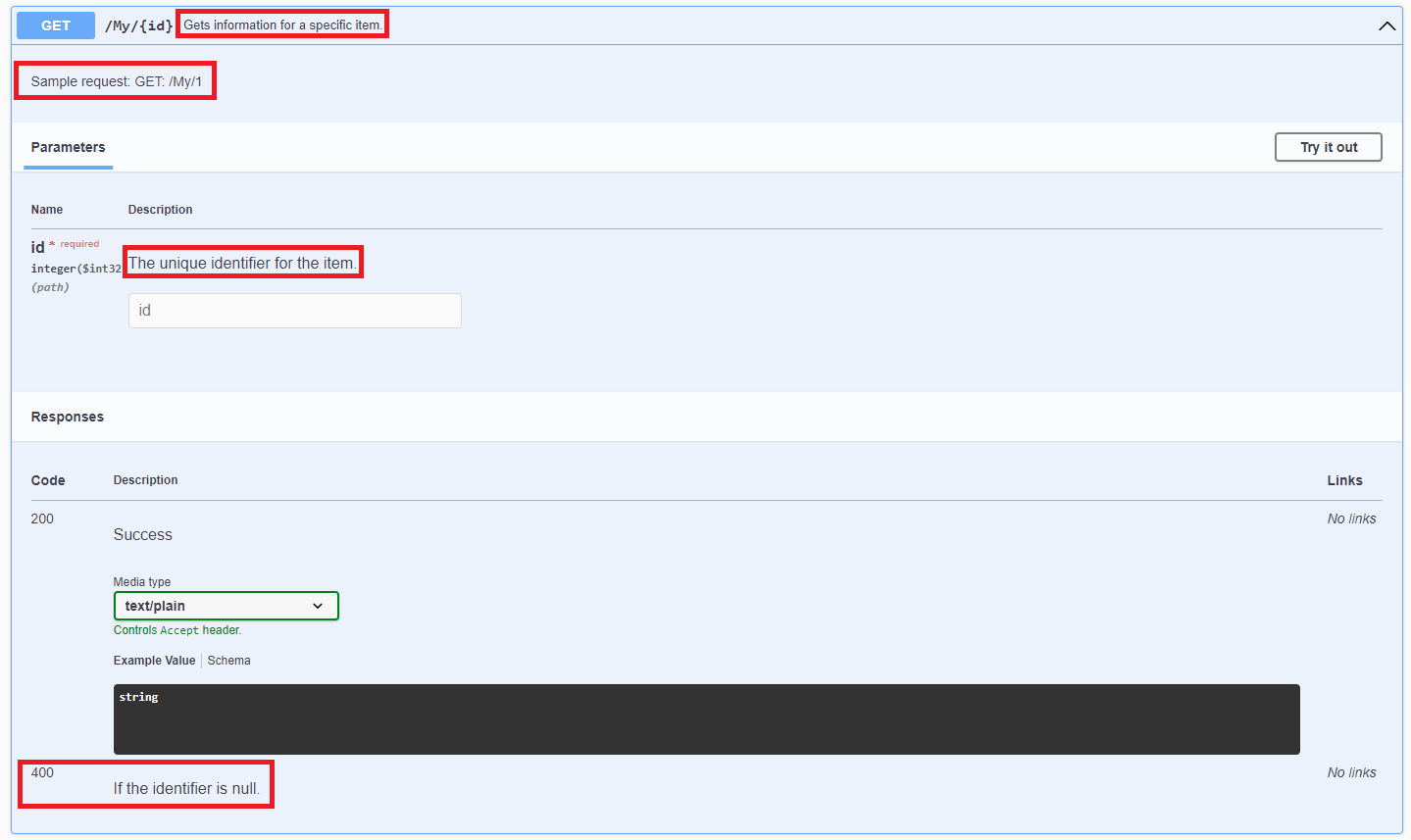
/// <summary>comments above Actions or Models to have them automatically displayed in the Swagger UI.
- Set
- Custom Input Fields: Implement the
Change Log
- 2023-08-04 Initial version created.